From quote to production to despatch, tracked. Without a whiteboard holding it together.
For manufacturers and fabricators running production with 20 or more staff.
Quotes in spreadsheets, job cards on paper, materials ordered when someone notices they're low, and no real idea what a job cost until it's shipped. We build production systems around your workflow so the floor and the office see the same thing.
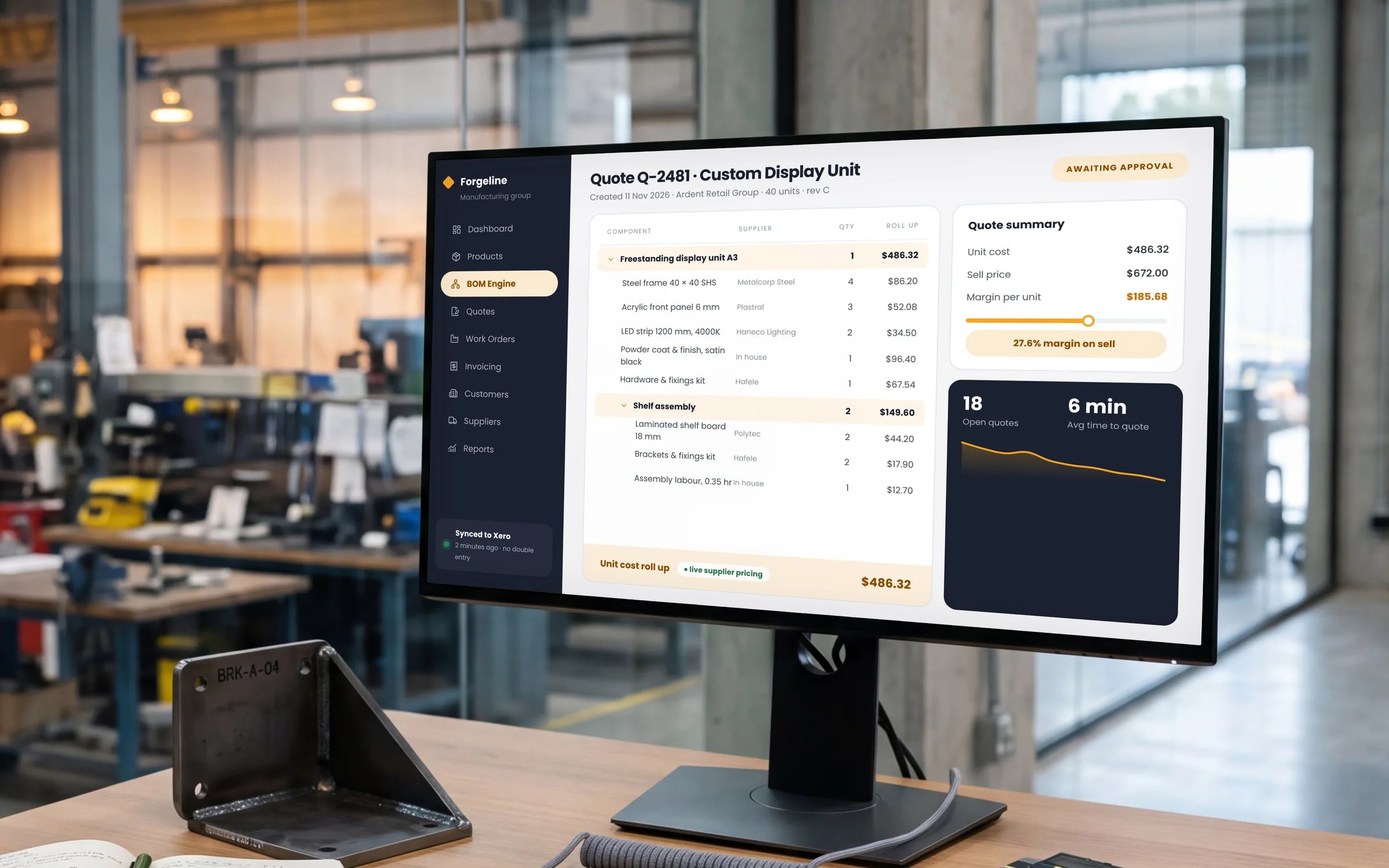
A day in your business, rebuilt. Watch it run.
The same day you have now, with the system doing the chasing. Pick any moment to stop on it.
Scheduling · now
The production schedule is set from confirmed orders and machine capacity.
Illustrative. Based on how businesses like yours usually run.
Where the hours go. What we hear from almost every business like yours.
- 01Nobody can see where a job isCustomers ring for updates and someone walks the floor to find out.
- 02Material shortages stop the lineStock is ordered when it runs out instead of when the schedule needs it.
- 03Job costing is guessworkLabour and material actuals never make it back against the quote, so pricing doesn't improve.
What you're probably running now. And what replaces it.
Today5 separate tools
- Quoting spreadsheets
- Paper job cards
- A whiteboard production schedule
- An accounting package
- Supplier portals and email
With your own system
One login. One record of every job, customer and dollar.
- Quoting & BOMs
- Production scheduling
- Shop-floor tracking
- Materials & purchasing
- Quality & traceability
- Job costing
★★★★★
“We were impressed with the sheer professionalism displayed by TJ and Harry.”
What we'd build for you. Pick the parts that hurt most first.
Nobody needs every module on day one. We usually start with the one costing you the most hours, ship it in weeks, and add the rest as it proves itself.
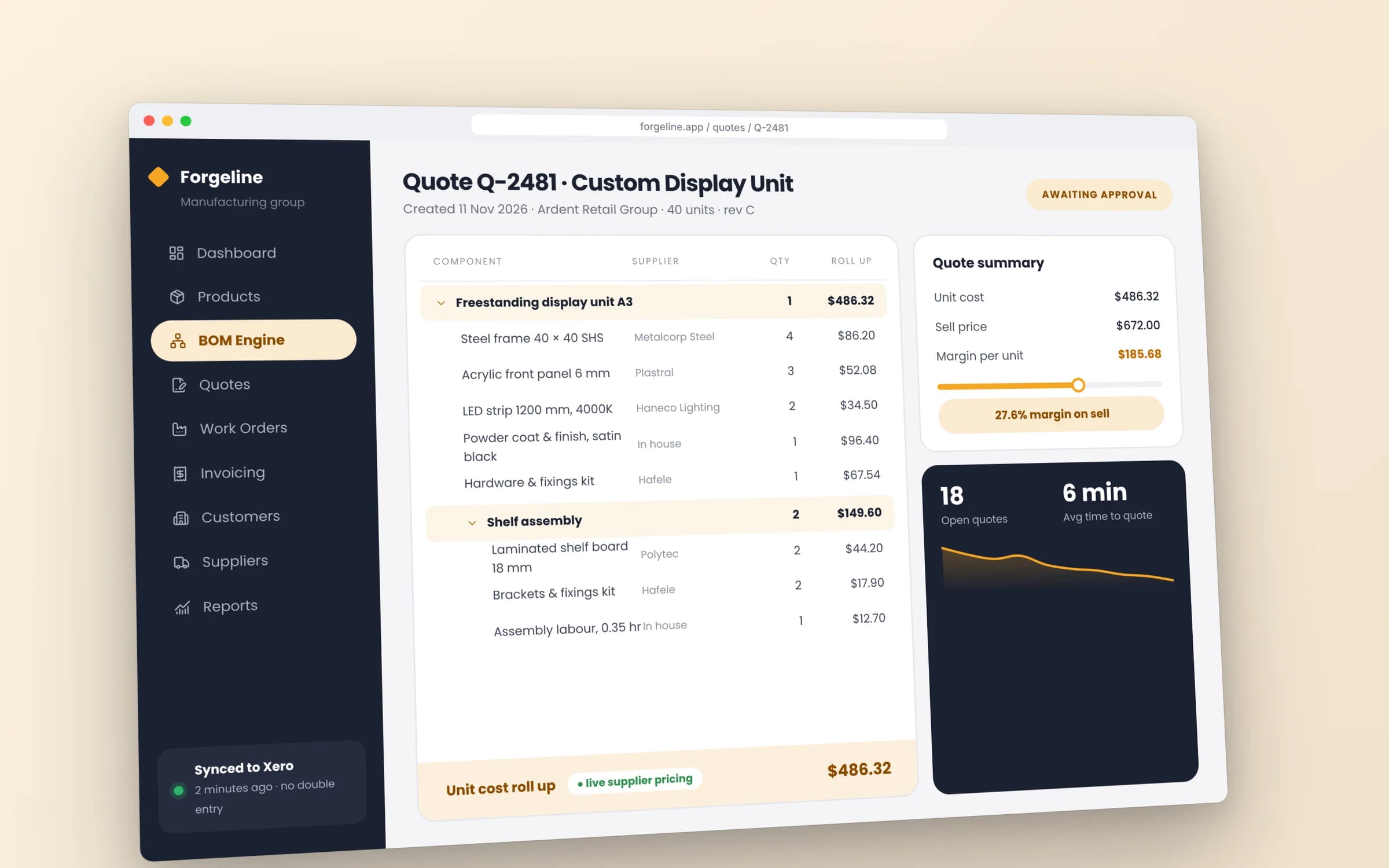
Quoting & BOMs
Quotes built from bills of materials, routings and your margins.
Production scheduling
Jobs scheduled against machine and labour capacity.
Shop-floor tracking
Operators clock jobs and stages on tablets; the office sees progress live.
Materials & purchasing
Requirements from the schedule, reorder points and supplier orders.
Quality & traceability
Inspections, batch records and traceability per job.
Job costing
Actual labour and material cost against every quote.
The morning, already sorted. What needs you is at the top.
Cash, overdue invoices and today's work on one screen when you sit down, with the two or three things that need a decision pulled out and the rest already handled.
Five years of renting, against owning. The gap is what you keep.
The rules you work under. Built into the system, so the record keeps itself.
- WHS Act duties for plant (OHS Act in Victoria)
- Machine inspections, maintenance and operator competencies are recorded, with reminders before they fall due.
- Fair Work modern awards and record keeping
- Clock on and off times are kept as employee records and passed to payroll for the award that applies.
- Food Standards Code: Standard 3.2.2 recall systems (where you manufacture food)
- Ingredient batches are recorded against each production run, so the system can list which customers received an affected batch.
- Single Touch Payroll
- Hours from the floor flow to your payroll software, which reports each pay run to the ATO through Single Touch Payroll.
The numbers you’d see live
- Jobs delivered on or before the promised date
- Quoted against actual cost by job
- Work centre load against capacity for the next two weeks
- Jobs waiting on materials
- Scrap and rework hours by stage
- Quotes won by product type
How it all connects. One core, and the tools you keep.
Your accounts, payroll and the other tools that work stay where they are. The system sits in the middle, so nobody types anything twice. Hover or tap a tool to see what moves across.
Parts of your system
- Quoting & BOMs
- Production scheduling
- Shop-floor tracking
- Materials & purchasing
- Quality & traceability
- Job costing
Running
Your system
Manufacturing
- Logins
- One
- Record of each job
- One
- Owner
- You
Tools you keep, connected
Your system → Xero
Agents do the reading and typing. People keep the decisions.
The agents run inside your own system, on your data and your rules. They read, match and draft. Wherever money, safety or a customer is involved, a person signs off, and every action is logged.
Quotes from drawings and RFQs
TodayEstimators work each RFQ from scratch.
With an agentReads the RFQ, finds similar past jobs and drafts a quote with materials and machine time.
Where you come inThe estimator adjusts and approves.
Production scheduling
TodayThe schedule is a whiteboard that's out of date by 10 am.
With an agentRe-plans the floor when a machine goes down or a rush order lands, and shows what moves.
Where you come inThe supervisor accepts the change.
Supplier follow-ups
TodayLate materials are discovered when the job is due to start.
With an agentConfirms dates with suppliers ahead of time and warns you which jobs a delay will hit.
Where you come inRescheduling decisions stay with you.
What software does a manufacturing business need?
A manufacturer needs one system that builds quotes from bills of materials and routings, schedules jobs against machine and labour capacity, lets operators record time and stages on the floor, orders materials from what the schedule needs, and costs every finished job against its quote.
Traceability and quality checks sit alongside. Hypex builds production systems around your workflow, starting with the part costing you the most hours.
Reviewed by the Hypex team, Port Melbourne
Manufacturing: questions owners ask.
What MRP or ERP software suits a small manufacturer in Australia?
The right MRP or ERP for a small manufacturer is the one that handles your bills of materials, routings and job costing the way you actually make things. Unleashed and Katana handle inventory and assemblies for many small makers, and NetSuite covers a wider ERP scope for larger businesses. If your work is mostly make to stock with simple assemblies, one of those may fit with little change. If you make to order, quote every job, or run a process with many stages, a custom system built around that process is often a better fit than reshaping a packaged ERP.
How do I do accurate job costing in a fabrication shop?
Accurate job costing comes from recording actual labour time and actual materials against each job as the work happens, then comparing them with the quote. Operators clock on and off jobs and stages at each station, materials are issued to the job from stock or purchase orders, and outside work such as galvanising or powder coating is charged to the job from the supplier invoice. When the job finishes, the system shows quoted against actual for each part. Over time, those results feed back into better quoting rates.
How do I schedule production around machine capacity?
You schedule production around capacity by giving each machine or work centre its available hours, giving each job its routing with the time per operation, and letting the system place jobs where there is room. This is often called finite capacity scheduling. The schedule shows when each job will reach each station, which work centres are overloaded, and what happens to delivery dates if a rush job is added. Planners still make the final call, but they make it from a picture of the whole floor instead of a whiteboard.
How do I get operators to record time on jobs without slowing them down?
Operators record time without slowing down when it takes a scan or a tap at the station, with nothing to type. A tablet or scanner at each work centre lets them scan the job card barcode to start and stop, pick a reason when they pause, and record quantities completed. The screen should only show what that station needs. When the floor can see that the data stops people walking around asking where a job is, it gets used. The office sees progress live from the same scans.
MRP or reorder points: how should I plan materials?
Use MRP for materials that go into scheduled jobs, and reorder points for consumables and stock items with steady use. MRP, or material requirements planning, works out what you need and when from the production schedule and the bills of materials, then nets that against stock on hand and on order. Reorder points simply reorder when stock falls below a set level. Most manufacturers need both. The system can draft purchase orders from either method, grouped by supplier, for someone to approve.
How do I trace batches and heat numbers for a customer audit or recall?
You trace batches by recording the batch, lot or heat number of every material when it is received, and recording which of those batches were issued to each job. Mill certificates and supplier documents attach to the batch record. When a customer asks what went into a finished product, or a supplier warns you about a batch, the system shows which jobs used it and which customers received them. Inspection results and sign-offs at each stage can be stored on the same record for a complete history.
Do you build software for small and mid-sized manufacturers?
Yes. We build quoting, production scheduling, shop-floor tracking, purchasing and job costing systems for manufacturers and fabricators.
Is a custom system better than an ERP for us?
It depends on how standard your process is. If an ERP fits with little change, use it. If you'd spend a fortune customising one, a system built around your process is often the better asset.
You own it
The software and its source code belong to your business. No per-seat fees growing with every hire.
What owning meansFunding may help
Parts of some builds may qualify for the R&D Tax Incentive. We'll help you and your adviser work out which.
How the incentive worksKnow your numbers
Add up what your subscriptions, re-keying and workarounds cost you each year before you talk to anyone.
Open the calculatorWeighing up a packaged product?
Show us how you run it today.
Thirty minutes with the people who would build it. We'll map where the hours go and tell you honestly whether custom software is worth it for you.