Skip to content

Every site cleaned, checked and billed. Without chasing a single timesheet.

For commercial cleaning and facilities businesses with field staff across many sites.

Rosters change daily, staff move between sites, clients want proof the work was done, and payroll needs hours that someone has to piece together. We build the system that schedules your people, proves the work and bills the client.

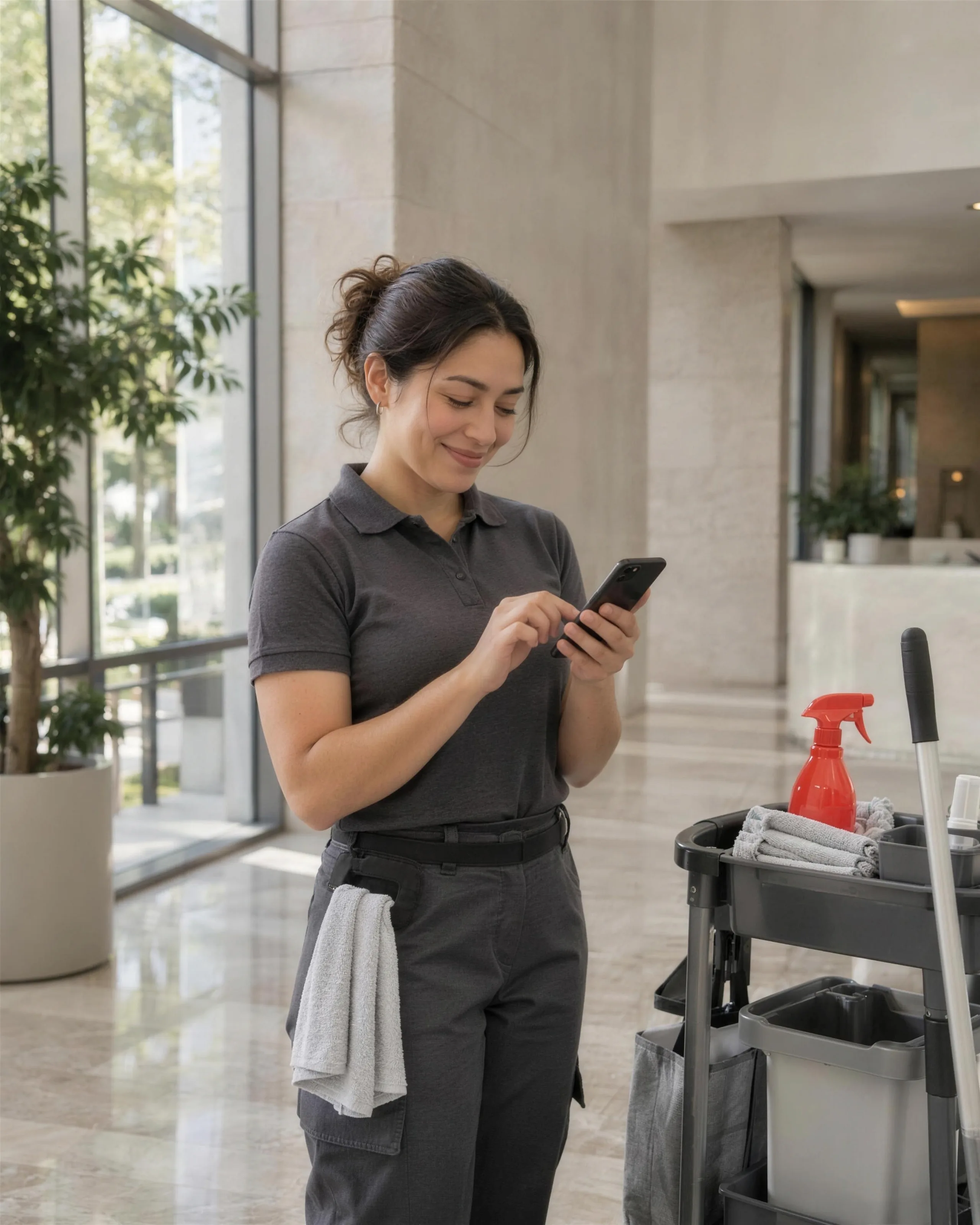
A cleaner's job app held in an office lobby
0separate tools a business like yours usually runs
0parts in the one system that replaces them
0tools it connects to, so nothing is typed twice
0%of the code, data and IP yoursNo per-seat licence fees

A day in your business, rebuilt. Watch it run.

The same day you have now, with the system doing the chasing. Pick any moment to stop on it.

Your system5:00 am
RosteringField appProof of servicePayroll & billing

Rostering · now

A cleaner calls in sick. The best available replacement is offered the shift.

    Illustrative. Based on how businesses like yours usually run.

    Where the hours go. What we hear from almost every business like yours.

    • 01Clients ask for proofComplaints come in and you have no record of who cleaned what, when.
    • 02Rostering is a daily puzzleAbsences and new sites mean someone rebuilds the roster by phone every morning.
    • 03Hours don't match the contractTimesheets and site hours drift, and you either overpay staff or underbill clients.
    A commercial cleaner in a neat uniform signing off a checklist on a phone in a bright office lobby, cleaning trolley beside her, red spray bottle

    What you're probably running now. And what replaces it.

    Today5 separate tools

    • A rostering app
    • Paper or app timesheets
    • Spreadsheets for site schedules
    • Email for client requests
    • Xero or MYOB for payroll and billing

    With your own system

    One login. One record of every job, customer and dollar.

    • Sites & contracts
    • Rostering
    • Field app
    • Client portal
    • Payroll & billing

    What we'd build for you. Pick the parts that hurt most first.

    Nobody needs every module on day one. We usually start with the one costing you the most hours, ship it in weeks, and add the rest as it proves itself.

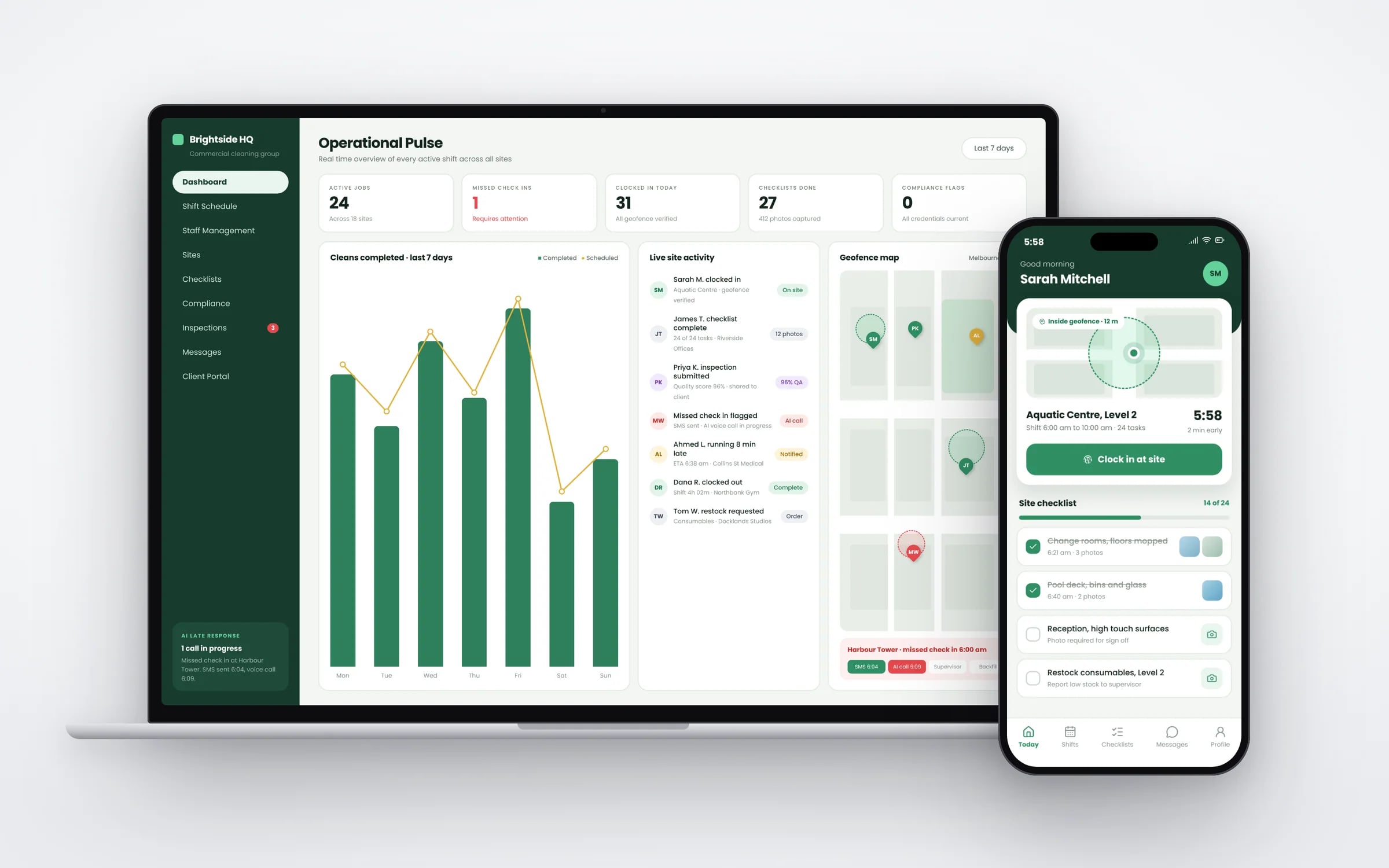
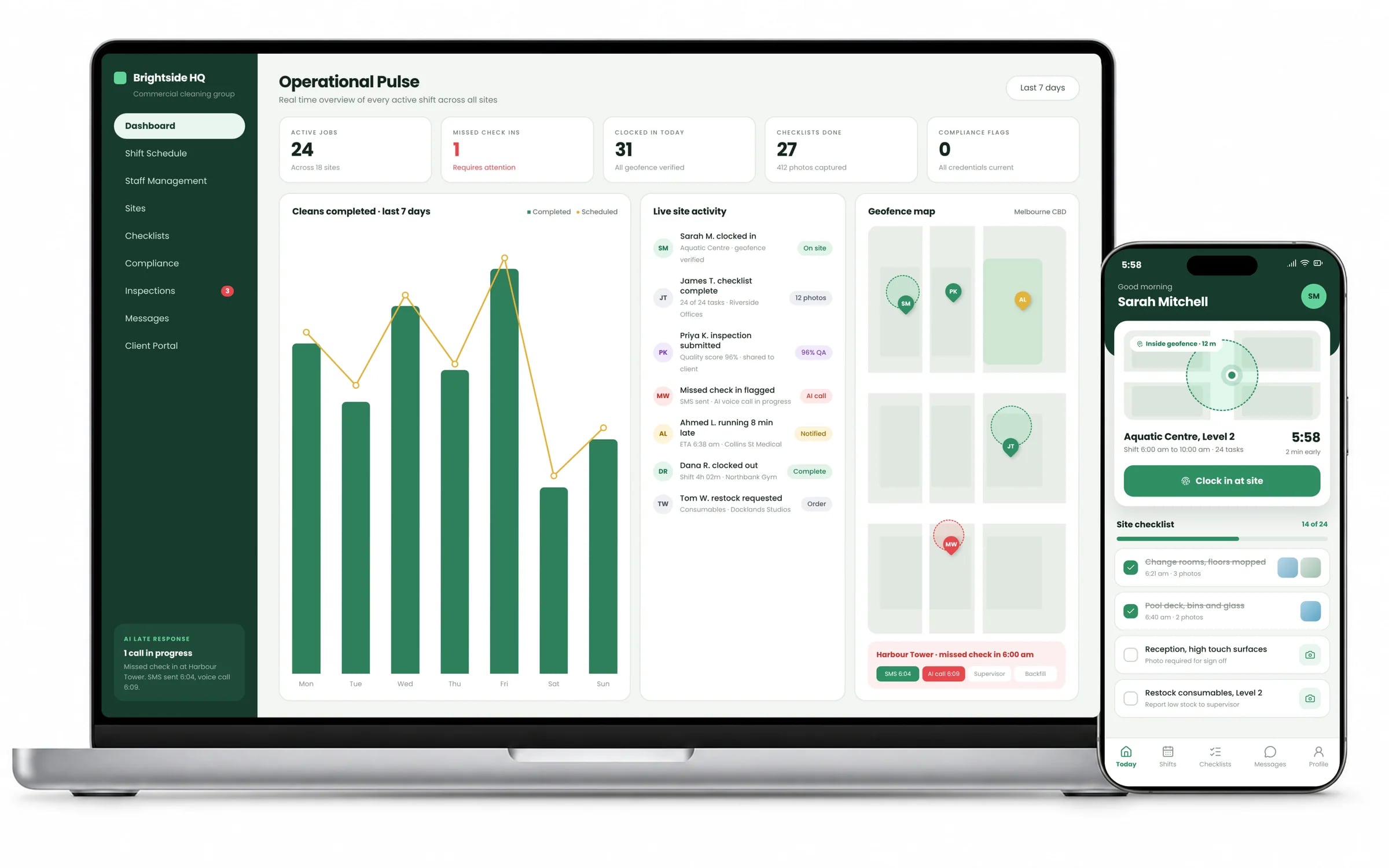
    Cleaning operations dashboard with the cleaner's GPS clock-in app
    Sites, cleans and clock-ins in one view. Example screens; the names on them are invented.

    Sites & contracts

    Every site's schedule, scope and contracted hours.

    Rostering

    Shifts by availability, skills and site, with replacements offered automatically.

    Field app

    Check-in, task lists, photos and incident reports.

    Client portal

    Clients see completed work, raise requests and download reports.

    Payroll & billing

    Verified hours to payroll and contract billing per client.

    ★★★★★

    “We were impressed with the sheer professionalism displayed by TJ and Harry.”
    Tejasvi S. · Milavo · Website build

    The rules you work under. Built into the system, so the record keeps itself.

    Cleaning Services Award 2020
    Shifts are costed with the award's rates and penalties as you configure them, so rosters show the labour cost before they are published.
    Fair Work record keeping
    Verified start and finish times are kept as employee records and passed to payroll each pay period.
    WHS duties for remote or isolated work (OHS Act in Victoria)
    Staff working alone check in and out on the app, and the system flags anyone who hasn't checked out when expected.
    WHS hazardous chemicals and safety data sheets
    Safety data sheets for the chemicals used at each site are stored against the site and available to staff on the app.
    Single Touch Payroll
    Verified hours flow to your payroll software, which reports each pay run to the ATO through Single Touch Payroll.

    The numbers you’d see live

    • Shifts with a verified check-in and check-out
    • Verified hours against contracted hours by site
    • Unfilled shifts on the day
    • Periodical jobs due without a booking
    • Audit scores by site
    • Client requests closed within the agreed time

    Rosters that fill themselves. A manager still signs each one off.

    When a shift opens, the roster agent asks the right people in order, checks hours and tickets, and proposes cover. A manager publishes it, and the rostering system and the staff member are updated.

    Five years of renting, against owning. The gap is what you keep.

    TodayYr 1Yr 2Yr 3Yr 4Yr 5A$540kPer-seat subscriptionsA$153kOne system you own
    Illustrative: 60 seats at A$95 a month, the team growing 15% and prices 7% a year. Run your own figures in the subscription calculator.

    Agents do the reading and typing. People keep the decisions.

    The agents run inside your own system, on your data and your rules. They read, match and draft. Wherever money, safety or a customer is involved, a person signs off, and every action is logged.

    Site reports

    TodaySupervisors write up audits and incidents after the shift.

    With an agentBuilds the client report from checklists, photos and timestamps as the shift closes.

    Where you come inIncidents get a person's review first.

    Covering absences

    TodayA sick call at 5 am means a manager ringing around.

    With an agentFinds qualified, inducted staff near the site and offers the shift by SMS.

    Where you come inIt can only offer shifts within your award and budget rules.

    Client requests

    TodayAd-hoc requests come by email and get lost.

    With an agentTurns each request into a work order with a price and a time, then confirms with the client.

    Where you come inQuotes over your threshold wait for approval.

    Built by Hypex · Cleaning & facilities services

    Cleaning service scheduling

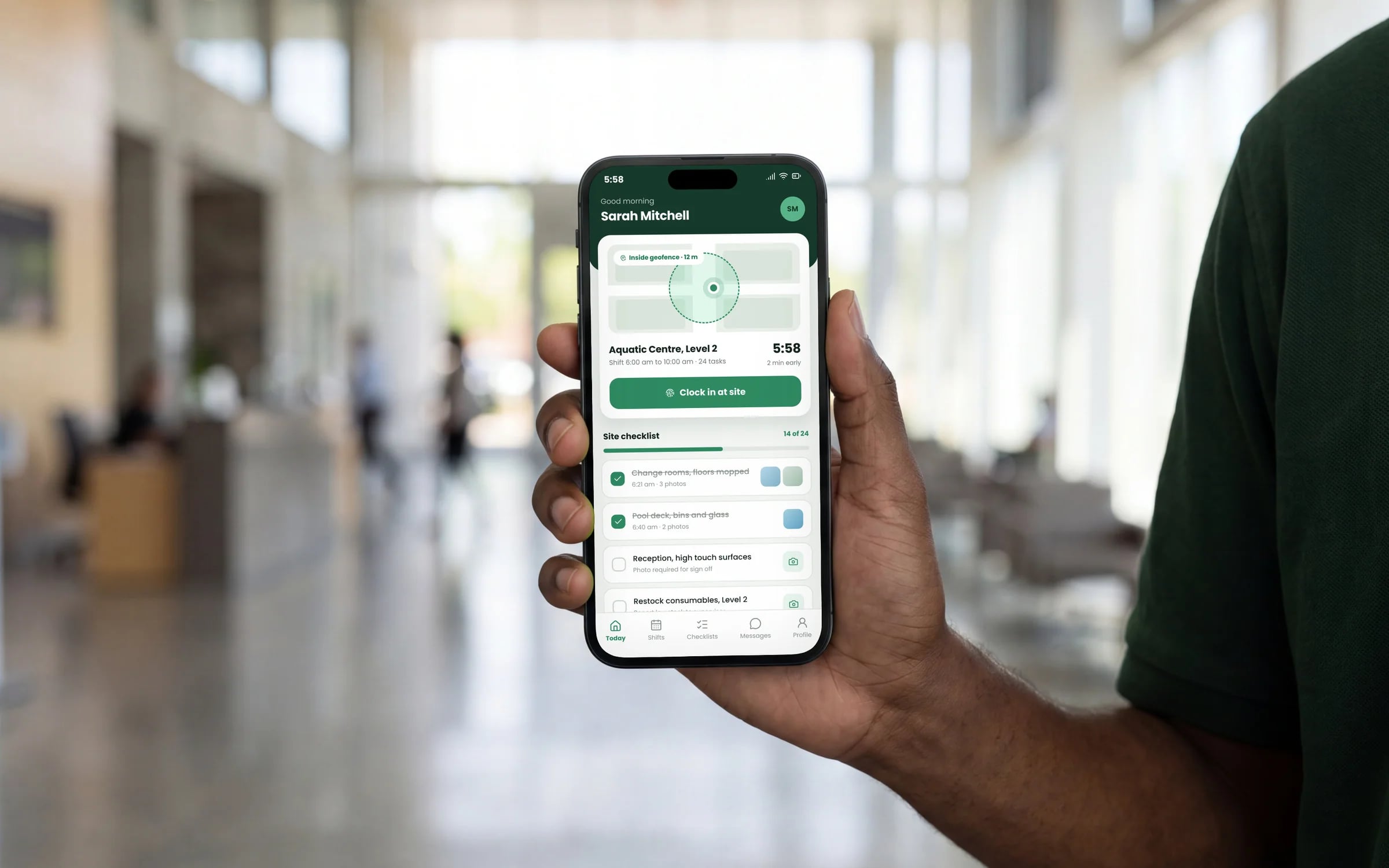
    Cleaning jobs, recurring visits and cleaner availability coordinated from one operations platform, with live schedules for office and field teams.

    • Cleaner scheduling
    • Job dispatch and status
    • Recurring service management
    Cleaning service scheduling interface

    How it all connects. One core, and the tools you keep.

    Your accounts, payroll and the other tools that work stay where they are. The system sits in the middle, so nobody types anything twice. Hover or tap a tool to see what moves across.

    Parts of your system

    • Sites & contracts
    • Rostering
    • Field app
    • Client portal
    • Payroll & billing

    Running

    Your system

    Cleaning & facilities

    Logins
    One
    Record of each job
    One
    Owner
    You

    Your system → Xero

    What software does a cleaning and facilities business need?

    A commercial cleaning or facilities business needs one system that holds every site's contract scope and hours, rosters staff across sites, verifies check-ins on location, records task checklists and photos as proof of service, and turns verified hours into payroll and client billing.

    A client portal handles requests and reports. Hypex has shipped a cleaning service scheduling system and builds these around how your sites run.

    Reviewed by the Hypex team, Port Melbourne

    Cleaning & facilities: questions owners ask.

    What is the best software for a commercial cleaning business in Australia?

    The best software for a commercial cleaning business is one that joins rostering, site check-in, proof of service and billing, because those are the four places hours and money go missing. Deputy is widely used for rostering and timesheets, and ServiceM8 for job management, and some cleaning businesses run both. A custom system suits you when sites, contracts and periodical work need to connect to rosters and payroll in a way separate tools don't, or when your clients want reports in their own format. Start by listing how a single site's hours move from contract to payslip to invoice.

    How do I prove my cleaners were on site?

    You prove cleaners were on site by having them check in and out on a staff app that records the time and their location, checked against the site's address, or by scanning a QR code or NFC tag fixed at the site. During the shift they complete the site's task checklist with photos of key areas. All of that sits against the site and the shift, and clients can see it in their portal. When a complaint comes in, you can show who was there, when, and what they did.

    How do I roster cleaners across many sites and shifts?

    You roster across many sites by starting from each site's contracted hours and service times, then filling shifts with people who are available, trained for that site and close enough to get there. The system should show gaps, overlaps and travel time between sites, and apply the penalty rates and other rules of the Cleaning Services Award 2020 so you see the real cost of each roster. When someone calls in sick, the shift can be offered to the best available replacements by text or app, and the first suitable person to accept gets it.

    How do I price a cleaning contract?

    You price a cleaning contract by working out the labour hours the site needs from its areas, tasks and frequencies, multiplying by your true labour cost including award penalties, on-costs and supervision, then adding consumables, equipment, travel and your margin. Your own records of similar sites are the best guide to hours. A system that holds actual verified hours per site lets you compare what you quoted with what each site really takes. Sites that run over can be repriced at renewal with evidence instead of a guess.

    How do I schedule periodical work like carpet cleans and windows?

    You schedule periodical work by adding it to each site's contract with its frequency, such as quarterly carpet cleans or six-monthly windows, and letting the system create those jobs ahead of time alongside the regular roster. Periodicals often need a different crew, equipment or an after-hours booking, so they are scheduled as separate jobs with their own checklist and sign-off. The client can see what is coming up and what has been done in their portal. Periodicals coming due without a booking are flagged, so they are delivered and billed.

    How do I run quality audits across cleaning sites?

    You run quality audits by giving supervisors an audit checklist for each site type on their phone, scoring areas and attaching photos of anything below standard. Each failed item can become a follow-up task for the site's team, with a due date and a photo when it is fixed. Audit scores over time show which sites and teams need attention before the client notices. Sharing audit results in the client portal shows clients the work is being checked, which tends to come up when contracts are reviewed.

    Can you build software for a commercial cleaning business?

    Yes. We build systems for scheduling cleaners across sites, proving work with check-ins and photos, client portals, and turning verified hours into payroll and billing.

    Show us how you run it today.

    Thirty minutes with the people who would build it. We'll map where the hours go and tell you honestly whether custom software is worth it for you.